Why Midscene's Action Space Is a Protocol
How many places do you have to touch to add a new action to Midscene?
This is my rough-and-ready test for whether a framework is well designed. If adding a “pull to refresh” gesture means changing the locating logic, changing the planning prompt, changing the execution dispatch, and then patching in a pile of if-else along the way, then sooner or later the framework gets crushed under its own action space.
Midscene’s answer is: you add it in one place. This post is about how it does that, and about the part it does not do.
What Is an Action
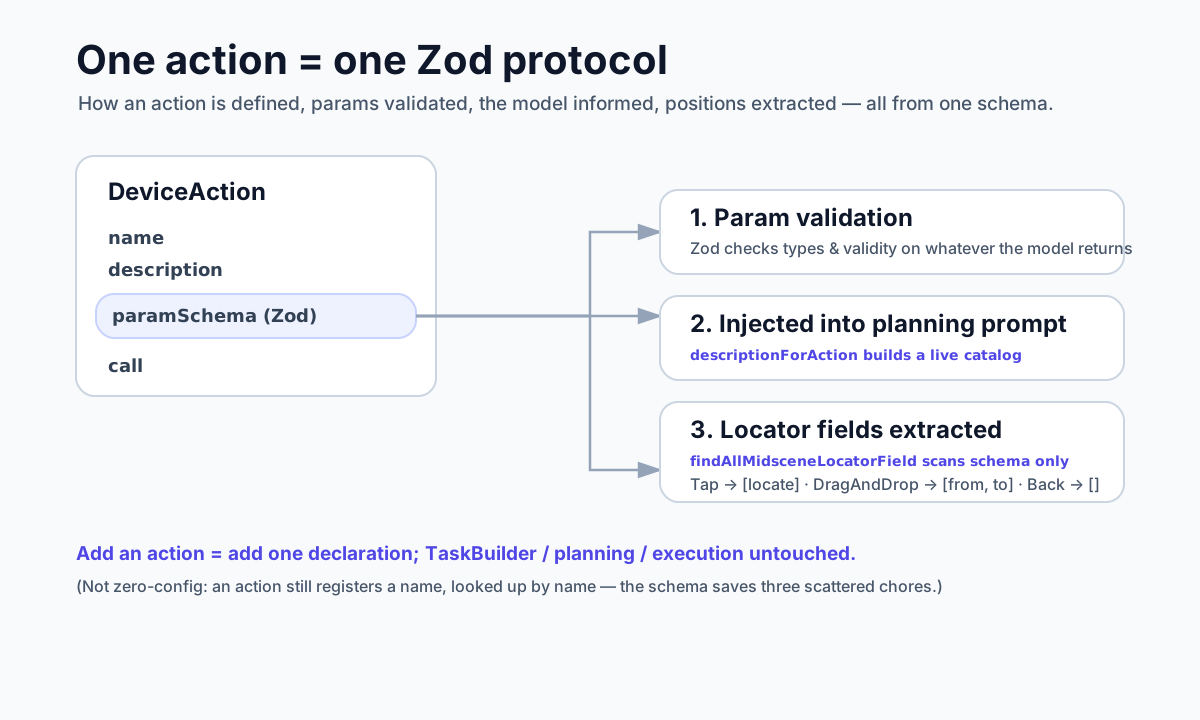
In Midscene, an action is not a hard-coded function. It is a declaration. Each action (DeviceAction) carries a few things: a name, a description for the model to read, a parameter schema written in Zod, and the call that actually runs it.
Each platform returns its own set of actions. Web has Tap, Input, Scroll, DragAndDrop, Navigate, and so on; Android adds, on top of the common gestures, a back key, a Home key, recent tasks, and a pull gesture; iOS has its own Home and app switching. They all come out of their own actionSpace().
So far this is all pretty ordinary. The interesting part is that schema.
Which Fields Are “the Ones to Find on Screen”
Among an action’s parameters, some need to be located on screen, and some do not. Tap needs to locate the element it taps; Input needs to locate the input box and also carry the text to type; DragAndDrop is more special, it has to locate two points — where to drag from, and where to drag to; and something like Android’s back key has nothing to locate at all.
The framework has to know which parameters of each action need locating first, so that it can find those positions one by one before execution.
The most straightforward way to write this is to branch on the action name: if it’s Tap, find locate; if it’s DragAndDrop, find from and to… but then every time you add an action, you have to come back and change that branch. The more actions there are, the longer this if-else gets, and the easier it is to miss one.
Midscene does not do that. It writes “this field needs locating” into the schema itself. Fields that need locating are marked with getMidsceneLocationSchema(). For example, drag and drop:
1 | export const actionDragAndDropParamSchema = z.object({ |
Then there is a function, findAllMidsceneLocatorField, which does not care what the action is called. It just walks the schema’s fields one by one, and whoever carries that mark is a locating field. For Tap it scans out [locate], for drag and drop it scans out [from, to], for the back key it scans out nothing. When TaskBuilder runs, it follows that result and prepares all the positions that need locating before doing anything.
Add a new action, and this step needs no changes at all — you just mark the fields that need locating in the new action’s schema, and it gets scanned automatically.
The Same Schema Quietly Does Two More Things
This schema is not only used to pick out locating fields.
It is a Zod schema to begin with, so parameter validation comes for free — whether the parameters returned by the model are correct, whether the types are valid, Zod handles all of that directly.
The third thing saves even more work: how does the model know which actions are currently available? The “list of available actions” in the planning prompt is not hand-written and frozen. It takes the current platform’s actionSpace, translates each action into a description on the fly based on its schema (descriptionForAction), and stitches that into the prompt.
So if you switch platforms, or add an action to some platform, the action list the model sees changes along with it automatically. On Android the model knows there is a back key to press, on Web it knows it can Navigate, and you never have to maintain two separate lists.
So What Does Adding an Action Feel Like
Take Android’s pull gesture as an example. You add an action declaration inside Android’s actionSpace():
1 | defineAction({ |
That’s it, you’re done. The recognition of locating fields needs no change (locate gets scanned on its own), the planning prompt needs no change (this action shows up in the list automatically), the execution path needs no change (when its turn comes, the framework calls its call). The core — TaskBuilder, planning, execution — does not need a single line touched.
It’s Not “Zero Config”, It’s “One-Place Config”
To be fair, this is not magic. You still have to write this action explicitly and give it a name — when TaskBuilder actually runs, it takes the action name the model returned and looks it up by name in actionSpace. There is no getting around that step.
What the schema saves you is the stuff that would otherwise be scattered around, maintained separately, and easiest to forget to keep in sync: the recognition of locating fields, the validation of parameters, the action description given to the model. These three things used to maybe live as three pieces of logic in three files, and adding one action meant getting all three in agreement; now they all derive from the same schema. The schema is the single source of truth for that action.
So rather than saying “extensibility is baked into the type system”, it’s more honest to put it plainly: everything an action should have is written in its own schema, and the rest of the framework reads from it instead of keeping a second copy.
Treating the action space as a protocol — the benefit is not that any one spot is especially clever. It is that they all point back to the same declaration: how an action is defined, how parameters are validated, how the model gets to know about it, how positions are extracted — all of it grows out of one place.
Adding an action, then, is no longer “change a whole loop around”, but “add one place”. For a project that has to be maintained for the long run, and across several platforms, this little difference only gets more valuable as time goes on.
Why Midscene's Action Space Is a Protocol
http://quanru.github.io/2026/05/27/Action-Space-as-a-Protocol