I Built a Plugin for My Obsidian Practice
Building an Obsidian plugin for A Practical Approach to Building My Second Brain with Obsidian!
The content of this article is out of date. Please refer to the official website LifeOS for more information.
Background
After recently sharing my Obsidian practice (A Practical Approach to Building My Second Brain with Obsidian), it has helped several people:
- A colleague I didn’t know said after trying it, “It’s like discovering a new continent,” and sent me a red envelope to buy coffee
- An internet stranger said after trying it, “It fulfills all my needs for personal knowledge management,” and even wrote an onboarding document for it
Beyond strangers, I also recommended it to many familiar colleagues and friends and received lots of feedback, such as high onboarding costs, difficulty keeping up with updates, and the inability to distinguish projects in the graph view (everything shows as README.md).
Goals
Considering the above issues, I decided to build a plugin with the following main goals:
- Lower the onboarding cost, especially for non-programmers
- Deliver updates promptly, whether new features or bug fixes
- Increase the user base to get feedback and collaboratively improve the workflow
At the end of this article, I also introduce a gradual approach to using this plugin!
The Old Way
In the example template without the plugin, there were several types of “program code”:
- Script types
- Date parsing date
- Parse dates from periodic note filenames
- Get date ranges from parsed dates
- Get file lists from parsed dates
- Task queries task
- Get task lists based on date ranges
- Project queries project
- Get current project list snapshot
- Get project list within date range
- Calculate time spent and proportion on projects within date range
- Area queries area
- Get current area list snapshot
- Get area list within date range
- Date parsing date
- View types
- Task completion view taskDoneList
- Placed in periodic notes, gets completed tasks within the current date range
- Task record view taskRecordList
- Placed in periodic notes, gets collected tasks within the current date range
- Project list view projectList
- Placed in periodic notes, gets project time proportion within the current date range
- Area list view areaList
- Placed in periodic notes, gets area list within the current date range
- Task completion view taskDoneList
Distributing code directly with the example template greatly increased onboarding costs, and users couldn’t update these scripts.
The New Way
Therefore, I decided to build a plugin to encapsulate both types of “program code” above, providing “views” through “markdown code blocks.” This way, users only need to know Markdown to read and use them. So what views does my plugin implement?
In the previous article, I mentioned that my practice has two contexts that keep me focused:
- One is time-based (Periodic Notes)—when I reach a certain time point, I work based on the corresponding periodic note, which contains sufficient context
- Another is topic-based (PARA)—when I want to investigate a certain topic, I work based on the corresponding topic’s index (README.md), which has already collected considerable context
Therefore, the views the plugin needs to implement are also based on these two contexts. For example, a monthly note (2023-07) should contain the context of all diary and weekly note tasks within July; for a PARA project (Share-2023-WOT Conference), its context should include all tasks and records tagged with #WOT.
The plugin currently provides three main categories of views:
Query by Time Context
The same code block below, placed in different periodic notes (monthly, weekly, daily), will parse and retrieve “Completed Task List (TaskDoneListByTime)”, “Recorded Task List (TaskRecordListByTime)”, “Involved Project List (ProjectListByTime)”, and “Involved Area List (AreaListByTime)” for the corresponding time range.
1 | ```PeriodicPARA |
1 | ```PeriodicPARA |
1 | ```PeriodicPARA |
1 | ```PeriodicPARA |
Query by PARA Context
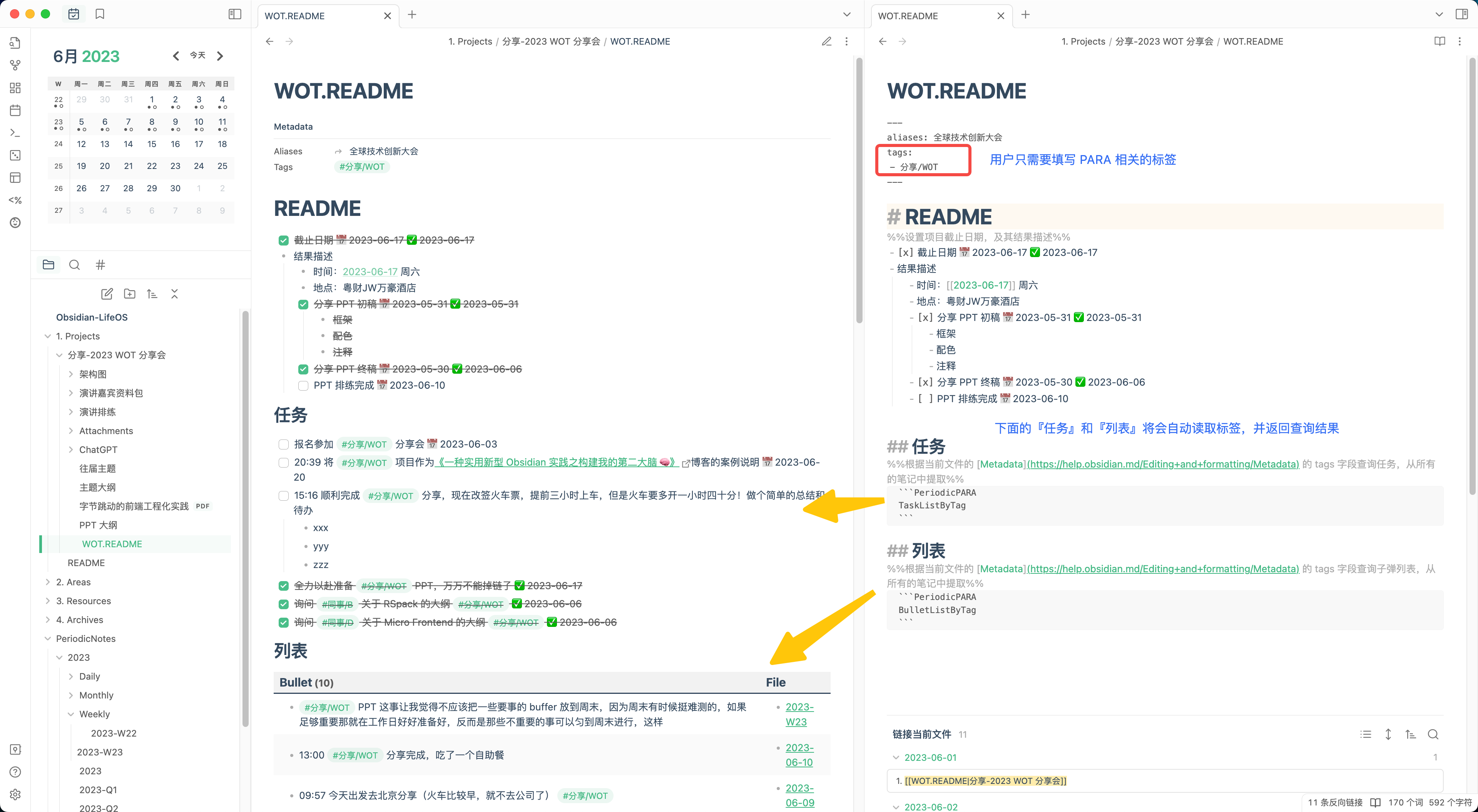
The same code block below, placed in README.md files in different PARA directories (e.g., 1. Projects/Share-2023-WOT Conference/README.md), will query the Metadata tags field declared in README.md and retrieve “Task List tagged with those tags (TaskListByTag)” and “Bullet List tagged with those tags (BulletListByTag)”.
1 | ```PeriodicPARA |
1 | ```PeriodicPARA |
Query by Directory
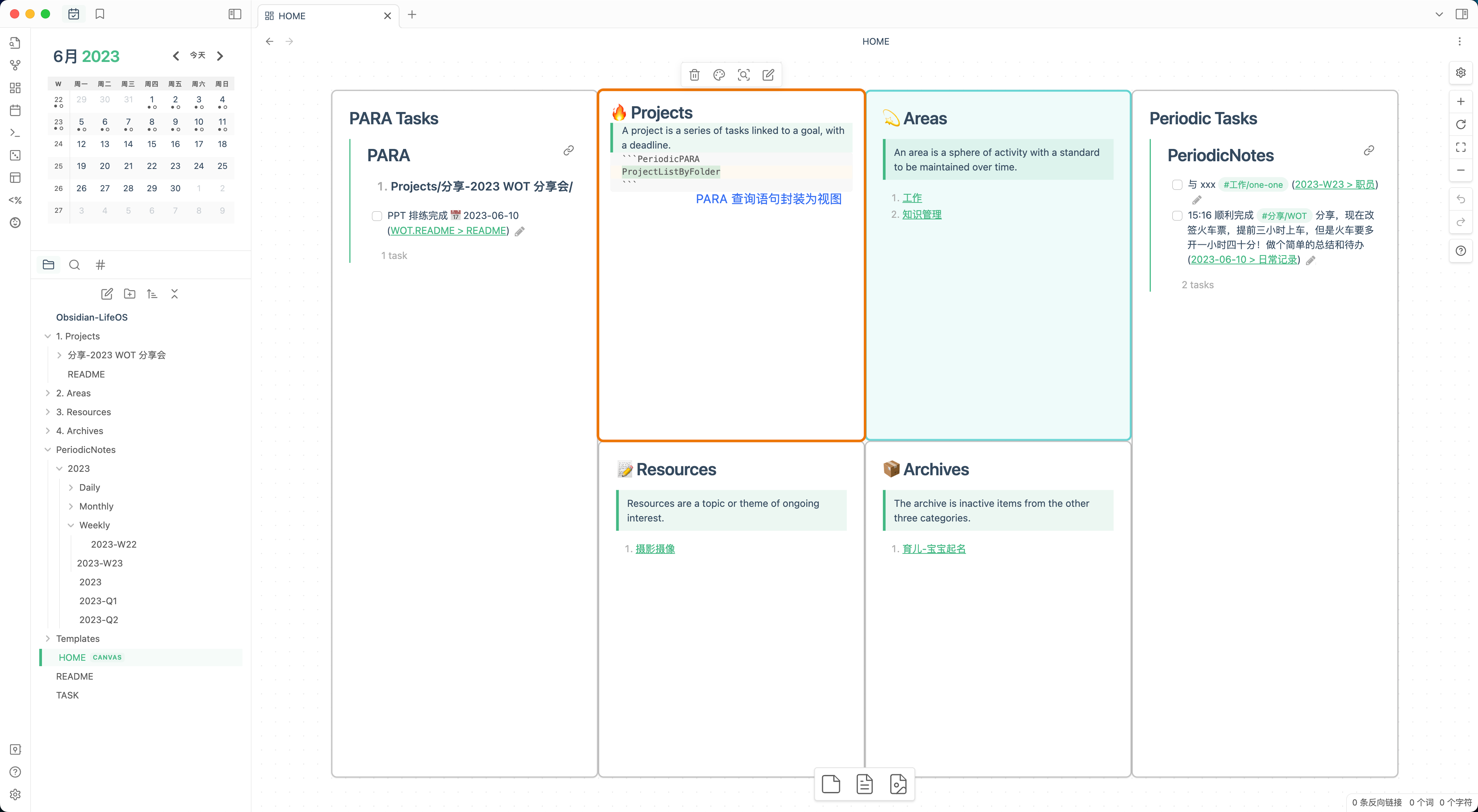
For an overview of current PARA, there’s also a directory-based view category, such as querying “All projects in the current project directory (ProjectListByFolder)”, “All areas (AreaListByFolder)”, “All resources (ResourceListByFolder)”, and “All archives (ArchiveListByFolder)”.
1 | ```PeriodicPARA |
1 | ```PeriodicPARA |
1 | ```PeriodicPARA |
1 | ```PeriodicPARA |
Besides the above views, the plugin also provides helper functions for use in periodic note templates. Currently there’s only one: generating a list of README.md files under a specified directory. For example:
This template statement:
1 | <% PeriodicPARA.Project.snapshot() %> |
Will be replaced with:
1 | 1. [[1. Projects/x-project/README|x-project]] |
This way, the project list is frozen as a snapshot when the daily note is created, serving several purposes:
- Record which days each project went through, with manual daily project time tracking
- In the future, weekly and monthly notes can aggregate which projects existed and track weekly/monthly project time
How to Gradually Adopt This System?
In the previous article, I mentioned that my practice consists of two systems: Periodic Notes and PARA. I later realized that practicing both simultaneously has a steep learning curve, especially for users who have never used Obsidian and don’t understand PARA. My advice for such users is: feel free to start with just Periodic Notes, removing everything PARA-related from the templates. You’ll still benefit from “DailyLog” and “time-based context”—just record your daily diary, and leave the rest to weekly, monthly, quarterly, and yearly reviews. Once you’ve practiced this and formed your own views and feelings, you can consider top-down task planning in weekly and monthly notes, and goal setting in quarterly and yearly notes!
What’s Next?
After using this workflow myself, I’ve truly gained a lot—which is why I can follow this practice day after day! I hope more users will try this system and co-create together, making it iterate faster, benefiting not just me but everyone!
Below is the small work I’ve done based on feedback received after publishing the previous article:
- Developed a plugin to lower the barrier, providing query views for periodic notes and PARA, hiding all complex query statements
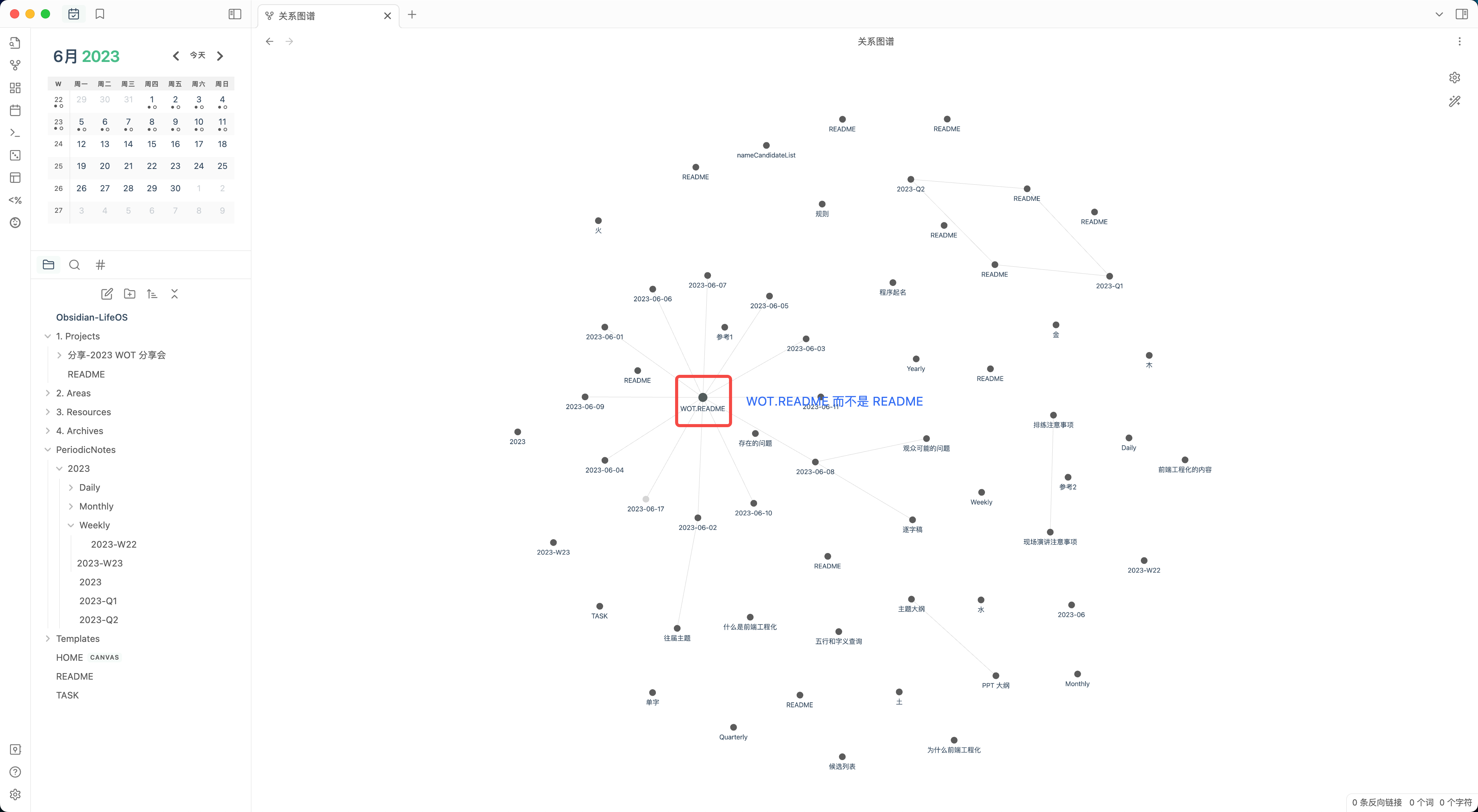
- Graph view optimization: supporting XXX.README.md as index files in PARA directories, otherwise all nodes would be README
- Single source of truth: users only need to set metadata, and the plugin handles reading it

I Built a Plugin for My Obsidian Practice
http://quanru.github.io/2023/07/16/I-Built-a-Plugin-for-My-Obsidian-Practice